Attack Surface Management:
The Complete Guide
Last reviewed: October 2026
Attack surface management (ASM) is the practice of finding everything your organization exposes to the internet, assessing each of those things for weaknesses, and watching them for change. The hard part is rarely the assessment. It is knowing what you have.
Most organizations can name their main website and their product. Far fewer can name every subdomain, every staging environment, every server a contractor spun up three years ago, and every certificate that is about to expire. Attackers do not need you to know. They only need one of those to be weak.
This guide explains what an attack surface is, what ASM tools actually check, and why the source of your asset list decides whether any of it is worth reading.
What is an attack surface?
Your attack surface is everything an outsider can reach and interact with, plus everything that reveals information about you. In practice that means domains and subdomains, web applications, APIs, mail servers, open ports and the services behind them, TLS certificates, DNS records, and cloud resources with public endpoints.
A concrete example
Take a company of eighty people with one product.
They know about company.com and app.company.com. Their attack surface also includes blog.company.com on a hosted platform nobody has logged into since the content lead left, staging.company.com which was meant to be temporary, vpn.company.com pointing at an appliance that stopped receiving updates, a DNS record for old-crm.company.com pointing at a cloud service the company cancelled, and mail records that let anyone send email appearing to come from the domain.
None of that is unusual. It is simply what happens when an organization operates for a few years.
External versus internal
Attack surface management means the view from outside - what someone on the public internet can see and reach without credentials. It is deliberately the attacker's perspective.
Internal assets, employee laptops, and anything behind the corporate network are a different problem handled by different tools. ASM does not cover them, and a tool claiming to do both is usually doing one of them shallowly.
Why it keeps growing
Attack surfaces grow quietly, through ordinary work:
- Shadow IT. A team signs up for a service and points a subdomain at it.
- Abandoned infrastructure. Projects end; DNS records outlive them.
- Cloud elasticity. Environments are created quickly and cleaned up slowly.
- Acquisitions and contractors. You inherit domains you did not create.
- Faster deployment. More releases mean more chances for a setting to be dropped without anyone noticing.
The result is a gap between what an organization thinks it has and what it actually exposes. ASM exists to close that gap.
What is attack surface management?
Attack surface management is the continuous process of discovering internet-facing assets, assessing their security, and monitoring them for change. It answers three questions in order: what do we have, what is wrong with it, and what changed since last time.
The work breaks into four steps:
1.
Discover. Build the inventory of internet-facing assets.
2.
Inventory. Decide which of them are yours, which matter, and who owns them.
3.
Assess. Check each asset for weaknesses, misconfigurations and known vulnerabilities.
4.
Monitor. Re-check on a schedule, because posture degrades between deployments.
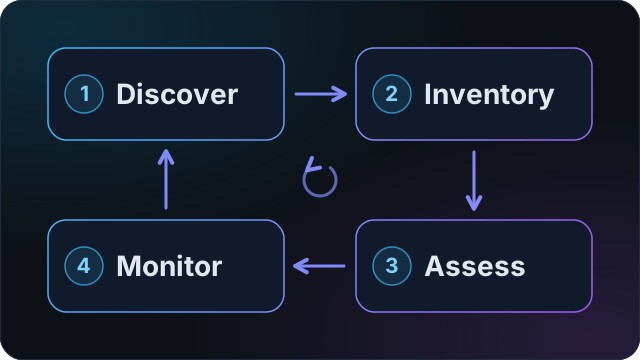
Step one is where most of the value and nearly all of the difficulty live.
Where the asset list comes from, and why it decides everything
Two tools can run identical checks and produce reports of completely different value, because they built their asset lists in different ways.
Approach one: guessing from the internet
Most ASM tools start with a domain and infer what else belongs to you. They read certificate transparency logs, passive DNS records, and public registration data, then apply heuristics: similar names, shared IP addresses, matching infrastructure.
This finds things you did not know about, which is genuinely useful. It also produces two predictable failure modes:
- Assets that are not yours. Shared hosting, a reused IP range, or a similar name pulls in a third party's infrastructure. Your report now contains findings about somebody else's servers.
- Assets it never finds. Anything that does not leave a public trace matching the heuristics stays invisible.
The first failure mode is the one that kills adoption. Once an engineer finds foreign assets in a report, every finding becomes suspect, and a tool that is not trusted gets ignored. It is a commonly cited reason teams abandon ASM platforms.
Approach two: importing from your source of truth
The alternative is to stop guessing and ask the system that already knows. Every organization's DNS provider holds an authoritative list of its zones and records. So does a zone file export.
If the inventory comes from the customer's own DNS account, a third party's asset cannot appear in it. The list is not a best guess; it is a fact, taken from the system of record.
The two approaches are complementary rather than opposed. Import establishes ground truth, and discovery finds what is missing from it. What matters is that the tool tells you which is which - so you know whether a given asset is something you declared or something the tool believes is yours.
What that means in practice
When evaluating any ASM tool, ask:
- Can I import assets from my DNS provider or a zone file, or does it only infer them?
- Does the report show me where each asset came from?
- What happens when it is wrong? Can I remove an asset and have that decision stick?
- Does the tool verify I actually control a domain before scanning it?
That last question matters more than it first appears. For HTTP Active and Extended scans, AYAsec requires proof of technical ownership - a DNS record, a file on the server, or a meta tag - before the deeper requests run. TLS, HTTP Passive, Ports, DNS, Credibility and Discovery can run without that technical check. You must still own or be authorized to test every target. We document the verification process step by step for eight DNS providers, including Cloudflare, AWS Route 53 and Azure DNS.
What ASM checks once it knows your assets
Once the inventory exists, assessment covers several layers. Each answers a different question and fails in a different way.
TLS and certificate configuration
Whether encrypted connections are actually secure: which protocol versions are enabled, which cipher suites are offered, whether the certificate is valid, correctly chained, and not about to expire.
Common findings are old protocol versions left enabled, certificates expiring without warning, and incomplete certificate chains that break on some clients and not others. What a TLS scan looks at in detail.
HTTP security and known vulnerabilities
Whether web applications are configured defensively, and whether the software running them has known flaws. This covers security headers, the technologies detected on each host, and matching those technologies and versions against published vulnerabilities - the CVE list.
A CVE is a publicly catalogued security flaw with a unique identifier. Matching your software versions against that catalogue tells you whether you are running something with a known, documented weakness. What an HTTP scan looks at in detail.
Open ports and exposed services
Which network ports answer from the internet and what is listening behind them. A web server on port 443 is expected. A database, a remote desktop service, or an administrative interface reachable from anywhere is not. What a port scan looks at in detail.
DNS configuration and email spoofing
Whether DNS is configured securely, and whether anyone can send email that appears to come from your domain. This covers SPF, DKIM and DMARC records for mail authentication, MTA-STS and TLS-RPT for mail transport security, DNSSEC for DNS integrity, and configuration that might leak your full record set.
Missing email authentication is among the most common findings and among the easiest to exploit, because it enables convincing phishing against your own staff, customers and suppliers. What a DNS scan looks at in detail.
Domain reputation
Whether your domains and addresses appear on blocklists or in threat intelligence feeds. Reputation problems surface as deliverability failures long before anyone investigates the cause.
Subdomains and forgotten hosts
Beyond enumeration, the specific risk here is subdomain takeover: a DNS record still points at a cloud service the organization no longer uses. Anyone who claims that service name now controls content served from your subdomain, with your name and often your certificate.
ASM, vulnerability management and penetration testing
These get conflated constantly. They answer different questions:
| Question it answers | Scope | Cadence | |
|---|---|---|---|
| Attack surface management | What do we expose, and is it weak? | Internet-facing, unauthenticated | Continuous or scheduled |
| Vulnerability management | What known flaws exist across our estate? | Internal and external, often authenticated | Scheduled |
| Penetration testing | Can a skilled attacker actually get in? | Scoped, agreed in advance | Periodic, usually annual |
ASM is the widest and shallowest. Penetration testing is the narrowest and deepest. Vulnerability management sits between them and usually assumes you already know what you own - which is the assumption ASM exists to stop you from making.
They are not substitutes. ASM tells a pentester where to look.
EASM, CAASM and the other acronyms
The category has collected four acronyms that get used as though they were interchangeable. They are not, and the difference is mostly about where the data comes from.
EASM - external attack surface management. The view from outside, without credentials: what someone on the public internet can reach. It is what this guide describes, and it is what AYAsec does.
CAASM - cyber asset attack surface management. Builds one inventory by pulling asset data out of the tools you already run - endpoint agents, cloud accounts, identity providers, a CMDB - through their APIs. It sees far more than an outside-in scan, internal assets included, but only where a tool is already installed and reporting. It cannot see the host nobody told it about.
DRPS - digital risk protection services. Watches what happens outside your infrastructure: leaked credentials, lookalike domains registered to impersonate you, your brand turning up where it should not.
CTEM - continuous threat exposure management. Not a product category at all. It is a program model - scope, discover, prioritize, validate, mobilize - and the tools above are things you would use inside it. A vendor selling you "a CTEM platform" is selling you one part of it.
The short version: EASM finds what you did not know you exposed, CAASM organizes what you already know you own, and DRPS watches what other people do with your name. Larger organizations end up running more than one. Smaller ones usually start with the outside view, because that is where the assets nobody remembers are.
How to run your first attack surface scan
Regardless of which tool you use, the sequence is the same.
1. Start with one domain. Your primary domain, not a full estate. You want a result today, not a project.
2. Verify it when needed. HTTP Active and Extended scans require a DNS TXT record, a file at a known path, or a meta tag on the homepage. Other scan types can start without technical verification. In every case, scan only systems you own or are explicitly authorized to test.
3. Let discovery run. You will get a list of subdomains and related hosts. Read it before anything else. The first genuine surprise for most teams is not a vulnerability; it is an asset they had forgotten.
4. Group what matters. Not everything you find deserves equal attention. Separate production from experiments.
5. Scan and read the findings by severity, not by count. Thirty low-severity header warnings matter less than one exposed database.
6. Put it on a schedule. A single scan is a snapshot. The value is in the comparison between scans.
What this looks like day to day differs by team: see security teams and managed service providers.
In AYAsec, this runs as Discovery on a domain, then a scan across the assets you keep. Assets can also be imported directly from Cloudflare, AWS Route 53, Azure DNS, Google Cloud DNS, DigitalOcean, GoDaddy, Hetzner or Contabo, or from an uploaded zone file. The guided workflow is step-by-step in the docs.
Every scan type is included on every plan, including the free one. Run your first scan
Common findings and what they mean
The same handful of issues account for most of what a first scan surfaces.
Subdomain takeover risk.
Outdated TLS protocol versions enabled.
Missing or misconfigured DMARC.
An administrative service exposed to the internet.
A certificate approaching expiry.
How often should you scan?
Security posture degrades quietly. A header disappears in a deployment. A certificate approaches expiry. A protocol gets re-enabled to fix a compatibility complaint. None of it is announced, and none of it breaks anything visibly.
That gradual erosion is the reason a one-off assessment ages badly. The practical answer depends on how often you deploy: weekly re-scanning is a reasonable baseline for a stable estate, daily is appropriate when you ship often, and what matters more than the interval is that someone is told when a grade drops rather than having to go and look. See how to build the remediation evidence trail.
Where this shows up in EU regulation
Two pieces of EU law now say, in different words, that you have to know what you run.
NIS2 (Directive (EU) 2022/2555) had to be written into national law by 17 October 2024. Article 21 lists the risk-management measures that essential and important entities have to take, and among them are vulnerability handling and supply chain security. Neither is possible for a host nobody has written down.
DORA (Regulation (EU) 2022/2554) has applied since 17 January 2025 to banks, insurers, investment firms and payment institutions operating in the EU. Article 8 is more direct: financial entities must identify, classify and document their information and ICT assets, map the critical ones including their configuration and their dependencies, and review that documentation at least once a year.
Read that requirement against the earlier section on where the asset list comes from. An inventory assembled by inference is a document you cannot defend entry by entry, because you cannot say why each line is in it or who decided it was yours. An inventory taken from the DNS zone you control can be explained to somebody who asks.
What this does not mean. AYAsec is not a compliance tool and does not produce an attestation. No scanner makes you compliant with either law, and a vendor who implies otherwise is selling you something. What a scan produces is dated evidence of what was exposed and what state it was in - the kind of thing an auditor asks for, and the kind of thing that is tedious to assemble by hand.